Every request to enhance or modify a report comes with time-consuming, iterative testing. In addition, testing is inherently subject to human error. When working with a table containing many rows and columns, it is easy to overlook a difference in a single cell, a single digit in a number, or even one letter in a text field. Such “small” differences can lead to completely different conclusions.
How Cognos testing works with Playwright and AI
It was precisely this repetitive yet highly important part of the development process that inspired the idea of automated testing. We created the first test manually with Playwright. The test logic – navigating Cognos, finding the tables, extracting the data – was written and refined by us.
Only once that flow was proven did we ask the next question: now that we know how this is done, can AI take over the repetitive part? That’s where AI came in, in the same setup we use across projects: an AI coding agent connected to Jarvis – our self-hosted enterprise AI platform. That word – self-hosted – matters here: the report data the test reads never leaves our infrastructure. This isn’t Jarvis’s first documented project, either: we recently used the same combination to automate writing data contracts and to analyse Airflow job failures around the clock.
The test is a comparative one: it runs the same Cognos report in two versions. The first is the baseline report, a backup report from the previous release. The second is the updated report, the one that has been changed and needs to be verified. The test opens the baseline report through the browser and reads the report’s content. It then opens the updated report and runs the identical flow against it and finally compares the two sets of results: if they match, the test passes.
In Cognos terms, this is the flow every BI expert knows: open the report, work through its prompt page – select filter values the way a user would – wait for the report to settle, then read what it renders. That means the tables on every page, the header, the legend with the description, and the conditional formatting down to a cell’s background colour. Where the report offers a drill-through, the test follows the link and reads the detail view as well. Nothing the test reads is invisible to a human eye; it simply never gets tired of reading it.
Under the hood, the whole comparison collapses to a handful of lines – we collect what each report shows into one object and compare the data:
Compare two report versions
// What the test reads from each report, gathered into one object
const a: FlowData = {
  firstTab:             aFirstTab,
  drillThrough:         aDrill.drillThrough,
  chosenDate:           aChosenDate,
  secondTab:            aSecondTab,
  legendAndDescription: aLegendAndDescription,
  // …
};
const b: FlowData = { /* the same fields, for the second report */ };

// The verdict: do the two reports match?
const differences = diffFlow(a, b);
if (differences.length > 0) {
  // If reports don’t match, create a differences report for review
  await writeComparison(testInfo, label, differences);
}
expect(
  differences,
  `Flow A vs B differs (${differences.length}):\n${differences.join('\n')}`
).toEqual([]);
When the two reports don’t match, this is what the review artifact looks like – a differences report from an actual test run; each row is one cell where report A and report B disagree.
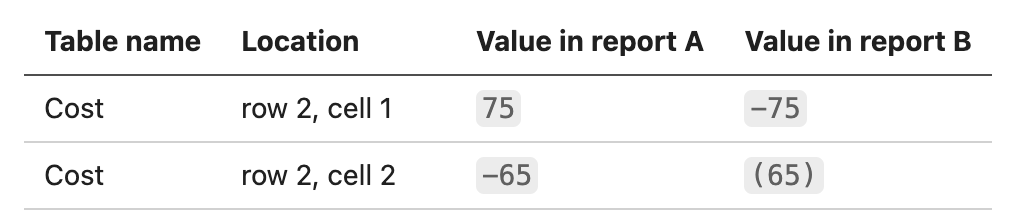
In cell 1, the numbers are different, while in cell 2, the same numbers are formatted differently.
How do we know it actually works? While building the test, we logged everything it extracted after every step – so we could see, line by line, what it reads from the report, not just that it passed. Once we were confident the extraction was correct, we removed that logging. What stayed is the visual record: the test keeps screenshots of both reports, so when something differs, the BI expert sees where the two reports diverge. That’s the line we draw in all our AI work: AI does the reasoning, but the verdict is never left to probability – the comparison of two reports is deterministic, and a difference either exists, or it doesn’t. And no, nothing ships unverified. Every test is reviewed by a person with technical knowledge before it’s trusted. The green checkmark is earned, not assumed.
Visual differences report, side by side – the numbers do not match, and the conditional formatting differs, as shown in the example below.
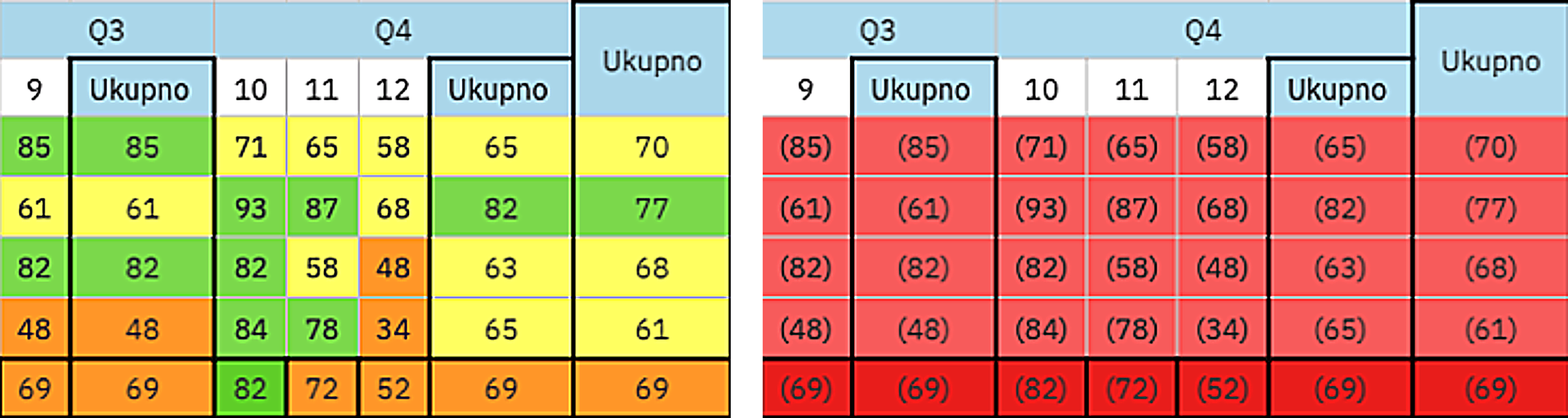
Values in the right example are multiplied by –1 and the conditional formatting is different – right example is configured to format negative values in brackets.
Why automate Cognos testing?
A report isn’t done when it’s delivered. As long as a Cognos report is in use, it needs testing – every time something changes in the report or in the data behind it. And the more complex the report, the greater the responsibility of testing it well, because in many companies important strategic decisions are made based on these reports. When the numbers drive the decisions, an error that reaches the business is not a cosmetic bug.
Two things the automated approach gets you in practice:
- One test, many filters. The same report with different filters is the same test with different parameters – coverage grows without new code.
- The baseline pattern. This is the one we’d highlight. When a report is rewritten or migrated, the natural question from the business side is: “How will I know the new report does the same thing?” Our answer: the old, proven report becomes the baseline. The automated test runs both reports, reads the data from both, and verifies they match. That’s not a one-time migration check – it’s proof, on every run.
And the pattern is not tied to rewriting a single report. The baseline is simply the report the business already trusts, and the candidate is whatever changed: a Cognos version upgrade, a change in the Framework Manager model or in the warehouse beneath it, a replaced source system, a refactored or rebuilt report. Each of those is the same comparison with different participants – which is exactly what makes it worth automating.
Put together: faster delivery of changes and confidence in the numbers people are actually making decisions on.
What a passing Cognos test proves – and what it doesn’t
One thing needs to be said plainly, because BI teams will ask it first: the comparison proves that the new report behaves identically to the baseline – not that the numbers are correct. If the baseline itself contains an error and the new report reproduces it faithfully, the test passes. That is why choosing the baseline is a business decision, not a technical one: it should be a report someone has already signed off on. The automated test then protects that agreement on every run that follows.
There are boundaries, too. The approach fits reports that already exist and are trusted – modified reports, change requests, regression testing after a refactor. It does not replace the first validation of a brand-new report, where there is nothing to compare against, and the logic itself has to be confirmed from scratch; for that, a BI expert remains irreplaceable. And today the test reads what the report renders on screen – cell values, headers, legends, colours – not the Excel and PDF exports, burst outputs or scheduled jobs, and not whether the underlying numbers agree with the source systems. That last part belongs to a different layer of the stack; one covered separately with data tests and data contracts. Each layer gets its own safety net – the report layer simply had none until now.
Scaling Cognos testing with a Playwright AI workflow
After we created the first test from scratch, the next step was to turn it into a skill – one not tied to a single tool: it works with Claude Code, Codex, OpenCode, Cursor, Copilot, Gemini and Pi – with our proven first test as its reference. Now a BI expert – not necessarily a developer – describes the test in plain language, the skill explores the report through the browser and writes the test, and a person always reviews the result before it’s trusted.
That description is where Cognos expertise lives. Which filter combinations matter, which boundary values are worth testing – the first day of a fiscal year, a total per category etc. – which tabs and drill-throughs a business user actually navigates: none of that is guesswork. Just as important is knowing what to ignore: the ‘generated on’ timestamp, the execution ID, the environment label that changes between runs. Distinguishing incidental metadata from data that carries business meaning is precisely the knowledge a BI expert has. And the skill asks when in doubt: if the live report behaves differently than described, it stops and asks one question at a time until the scenario is unambiguous – the expert drives, the AI does the clicking.
Playwright AI skill: a plain-language request and the test it generated
The skill asks:

The BI expert answers:

The skill generates:

This isn’t just a concept – we’ve proven it works. At its core is a reusable test skeleton that adapts to different reports and automates the testing – even without AI, the manual clicking is gone. With AI, it goes a step further: the skill writes those tests from plain-language input. BI expert still stays in the loop, but in a different role – they review and verify what the test produced. The result: regression testing that used to take hours of manual clicking now runs on its own – freeing people from repetitive, exhausting work.
Have Cognos reports you’re still testing manually? We’re happy to show you what this looks like in practice.



Falls Sie Fragen haben, sind wir nur einen Klick entfernt.