
If you work in IT, you’ve probably heard a version of this story about generative AI in software testing: “AI will replace testers”. Here’s the more accurate version: AI is replacing the boring parts of testing. And in doing so, it’s making testing one of the most accessible and interesting specializations in IT.
Generative AI (GenAI) systems built on large language models (LLMs), like GPT, Claude, or Gemini, can read requirements, write test cases, generate test data, draft automation scripts, and summarize test results in plain language. But they should do all of that under supervision, and knowing how to supervise it is quickly becoming a professional skill in its own right. The ISTQB even released a dedicated certification for it: Certified Tester, Testing with Generative AI (CT-GenAI).
In this article, we’ll walk through why testing is a natural fit for GenAI, what it can do, how to prompt it, where the pitfalls are, and what it could mean for your career.
Why testing is a natural fit for GenAI
Testing has always been more about communication than about code. You read requirements and user stories, you write test cases and defect reports, you turn vague business expectations into clear acceptance criteria. It turns out that “reading and writing structured language” is exactly what LLMs do best.
GenAI doesn’t remove the need for systematic testing knowledge, like test design techniques, coverage criteria, or documentation standards. Instead, it reduces the gap between “I understand systems” and “I can produce useful test work products.”
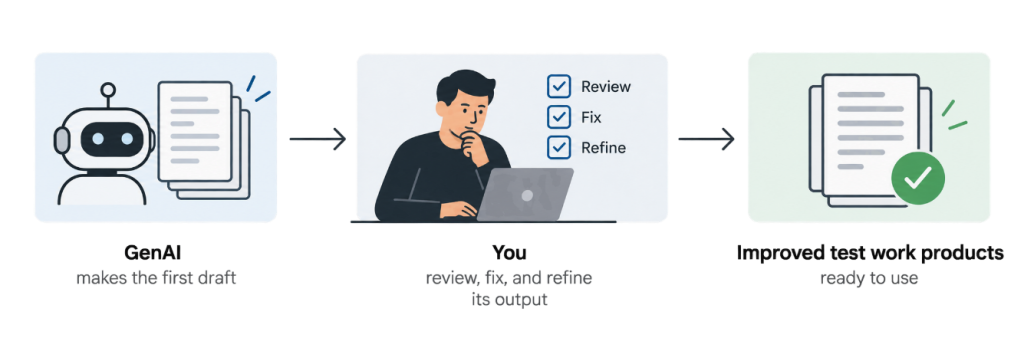
The typical process then becomes: GenAI makes the first draft, and you review, fix, and refine its output.
Generative AI in software testing: five practical uses
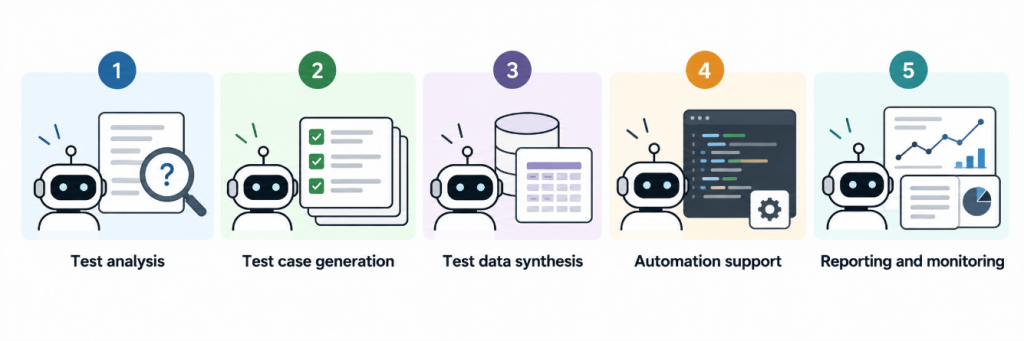
Based on where teams report real productivity gains, five areas stand out:
1. Test analysis. Feed the LLM a user story or requirement, and it can identify ambiguities and inconsistencies, draft acceptance criteria, and propose test conditions. It’s also surprisingly good at acting as a critical reviewer: “What’s unclear or missing in this requirement?” is a good first prompt for reviewing and refining it.
2. Test case generation. From acceptance criteria, an LLM can draft functional test cases with preconditions, steps, and expected results, and map them back to the requirements for coverage checking. You still decide what to cover and what not.
3. Test data synthesis. GenAI can produce realistic synthetic test data: lots of edge cases, privacy-preserving, tailored to your validation rules. No need to paste real customer data into a prompt. That part matters more than people realize.
4. Automation support. LLMs translate test cases into scripts for frameworks like Playwright, Cypress, or Selenium, explain failures in test logs, and help refactor selectors. For IT specialists coming from development, it feels like pair programming.
5. Reporting and monitoring. Test tools produce raw reports full of unstructured data. GenAI can analyze all of that and turn it into what you actually need: trend summaries, defect clusters, status reports, all written in plain language any stakeholder can understand.
Prompting that actually works
Modern models are very good at making sense of a sloppy prompt. Write “write tests for my app” and you won’t get gibberish. You’ll get something plausible. But in testing, plausible is the problem: the model doesn’t know your business rules, your system’s constraints, or what your team means by “done”. What separates generic filler from genuinely useful test output is not clever phrasing. It’s giving the model the right inputs, and that’s what prompting actually is.
The ISTQB CT-GenAI syllabus treats prompting as a core skill. Supplying the right input doesn’t get less important as models improve. The industry term for this is shifting from “prompt engineering” to “context engineering”, and it applies to testing too.
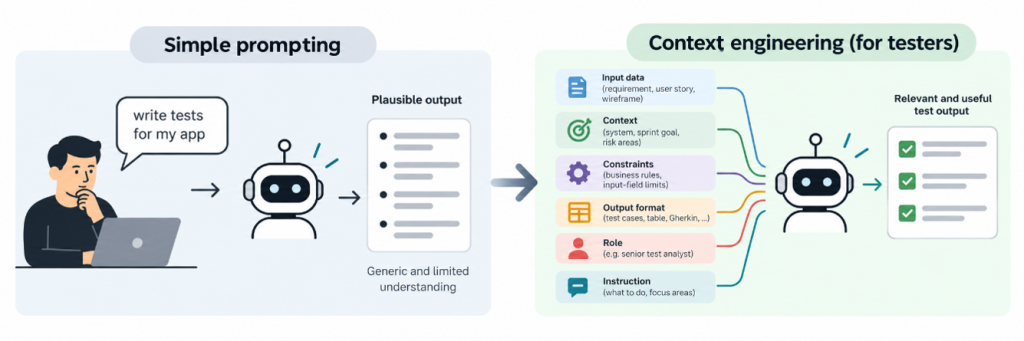
So what does the model actually need from you?
A useful prompt for test work gives the model: the input data itself (requirement, user story, wireframe), the context around it (the system, the sprint goal, the risk areas), explicit constraints (business rules, input-field limits), the expected output format, plus, where useful, a role (“You are a senior test analyst”) and a precise instruction.
Notice that most of these are things only you know. The model can’t invent your business rules. If you don’t supply them, it will guess. And testing is exactly where wrong guesses turn into defects.
Three techniques that stay relevant:
- Few-shot prompting: Show the model one or two examples of the output you want. If your team writes Gherkin scenarios a specific way, paste in an example scenario and the model will match the pattern. Models are great at imitating structure, but they can only imitate your structure if you show it.
- Prompt chaining: Don’t ask for everything in one shot. Break the task into steps and check each intermediate result: first find ambiguities in the requirement, then draft acceptance criteria from the corrected version, then generate test cases, then ask the model to verify coverage in a table. Each verified step becomes clean input for the next. As tasks get bigger, decomposition and verification keep you in control.
- Meta prompting: When you’re not sure how to frame a task, ask the model to help you draft the prompt, then refine it. For example, “I want to generate end-to-end test procedures from these acceptance criteria. Draft the prompt I should use, then improve it.”
In practice, these elements (input data, context, constraints, output format, role and instructions) are split across two prompts. The system prompt sets the standing rules: the model’s role, the standards it must follow, the boundaries it must never cross. It’s typically written once, by the developer building the tool, by the vendor of the test tool if the AI feature comes built-in, or by you in the tool’s configuration, and reused across requests. The user prompt is where you write the specific request: the input data, the examples, the instruction. This is the part you write and adjust with every task.
Here’s an example:
Notice that the prompt is mostly context: the story, the format example, the boundaries. The generation is the only part the model does on its own. The analysis of what context matters, and the verification of what comes back, are still yours. That is the part that doesn’t go out of date. Once you have a prompt that works, newer agentic tools can also turn it into a reusable skill or an agent that runs on a single instruction. Models will keep getting better, but supplying the right context and verifying each step are where the tester is irreplaceable.
The pitfalls
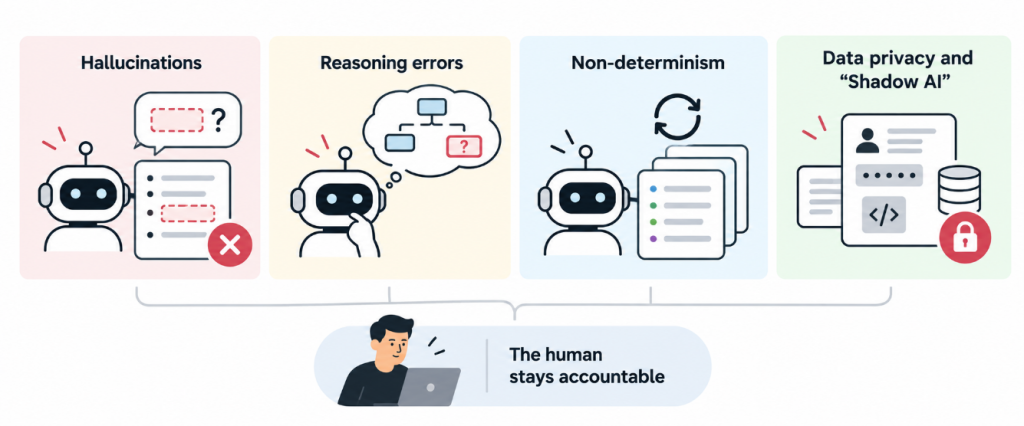
AI-generated work looks convincing even when it’s incorrect. These are the four risks you should know:
Hallucinations. LLMs can generate test cases for acceptance criteria that don’t exist, invent behavior, or produce scripts that reference non-existent functions. The mitigation: cross-check generated testware against the actual requirements. Treat every AI output as a draft from a junior colleague who sometimes makes things up.
Reasoning errors. For tasks requiring genuine logical reasoning (effort estimation, test prioritization), LLMs often produce plausible-looking but incorrect conclusions. Use LLMs as a thinking partner in those tasks.
Non-determinism. The same prompt can result in different output on different runs. If a generated test suite looks great today, save it. And build review checkpoints because you can’t assume reproducibility.
Data privacy and “Shadow AI.” This is the one that can get your organization into real trouble. Pasting real user data, credentials, proprietary code, or confidential requirements into a public AI chat tool may violate GDPR and your company’s policies. And using unapproved AI tools (“shadow AI”) creates security, compliance, and intellectual-property risks. The answer is a clear AI usage policy in your organization: which tools are approved, what data may be shared, anonymization rules, and quality gates for AI-generated testware. The rule for you: synthetic and anonymized data in prompts.
One principle covers all four risks: the human stays accountable. GenAI shifts the tester’s effort from producing artifacts to evaluating them.
Where to start
The good news is that you need just a few practical skills:
- Start using it on your own work. Whatever your current role is, take one task (a bug report, a log analysis, a feature description) and run it through an LLM. Review the output.
- Learn just enough testing methodology to review AI output. You need enough test design knowledge to recognize a missing boundary case or an uncovered acceptance criterion.
- Beware of the risks. Know the main risks (hallucinations, non-determinism, data privacy) and understand why the output can’t be trusted blindly.
- Consider a structured path. The ISTQB CT-GenAI certification covers prompting techniques for test tasks, risk management, and how organizations adopt GenAI in testing.
The takeaway
Generative AI doesn’t replace testers. It replaces the boring parts of testing. The testers emerging from this shift spend their time deciding what to test and evaluating what the AI produces.
For an IT specialist, there has rarely been a better entry point: the tools are accessible, the learning curve is short, and organizations are looking for people who know how to use LLMs well. And that could be you.