In the first part of this series, Nikolina talked about how rising costs and the limitations of legacy systems in the AI era are driving organizations toward the Lakehouse – a single, scalable home for data, analytics, and AI. She outlined the multi-phase roadmap of migrating from a legacy data warehouse to a modern Lakehouse architecture. Covering everything, from initial assessment and architecture design, to data and ETL migration, all the way to final optimization.
In this second blog, we shift our focus to the technical execution of the ETL migration. We dive into one of the most complex and critical phases of the migration process: migrating ETL workloads. Specifically leveraging Databricks Lakebridge, Databricks migration tool, for migrating from Informatica PowerCenter ETL logic and traditional Oracle data warehouse to a modern Databricks Lakehouse platform.
Using representative workloads, we demonstrate how Lakebridge fits into the migration process, where it helps accelerate and simplify ETL migration and modernization, and where additional effort and redesign are still required.
We further improved and automated the ETL migration process in the third blog of the series, complementing Lakebridge with Jarvis, our internal LLM tool. Jarvis assisted us in refining the transpiled code, resolving remaining gaps, and bringing the pipelines closer to production readiness.
Approach and Scope
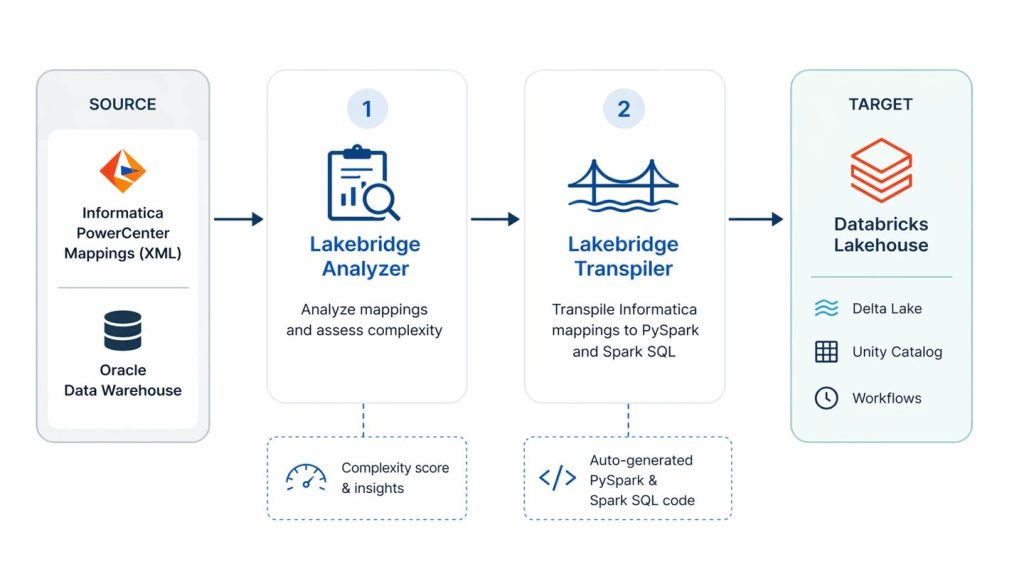
To fully assess the capabilities of Databricks Lakebridge first we selected a representative sample of Informatica PowerCenter XML mappings from an ongoing migration ETL scope, based on complexity scores provided from Lakebridge Analyzer, as shown in the migration process illustrated in the picture below.
Then using the Databricks Lakebridge Transpiler engine, we converted the Informatica PowerCenter ETL mappings into Databricks PySpark and Spark SQL scripts. In the end, we evaluated how effectively the transpiler captured and translated the original logic, providing a balanced perspective on both its strengths and current limitations.
Before diving into the details of our evaluation, let’s first take a closer look at what Databricks Lakebridge is, its core components and its role in the broader migration process.
Databricks Lakebridge
Manual ETL migrations are typically complex, tedious, time-consuming and slow, since they rely on translating logic manually from one platform to another. As the number of ETL workloads grows, the effort increases significantly, along with the risk of errors. Migrating to Databricks, however, can be much faster and more automated when using a tool like Databricks Lakebridge, which is designed to streamline and simplify this process.
Databricks Lakebridge is a migration toolkit for automating the migration process of moving legacy data warehouse workloads to Databricks. It structures the migration into three main stages:
- Assessment stage (Profiler and Analyzer) – evaluates the scope and complexity of the migration
- Transpilation stage (Transpiler) – converts source system code into Databricks-compatible code using pluggable engines
- Reconciliation stage (Reconciler) – validates results by comparing outputs between the source system and Databricks
According to Databricks, leaveraging Databricks Lakebridge in your migration process can automate up to 80% of the migration effort and reduce implementation time by up to two times.
In this blog, we’ll focus mainly on evaluating capabilities and limitations of the most important stage of the process – the Transpilation stage – because that’s where the actual conversion of your existing logic into Databricks-compatible code happens.
However, before anything can be converted, it’s important to first understand the size, scope and complexity of what is going to be migrated. That’s where Lakebridge Analyzer comes in. Think of it as a tool that takes a step back and gives you a clear technical picture of your current environment.
Assesment stage: Lakebridge Analyzer
Before converting any code, we must first establish a clear understanding of the existing ETL migration scope. As Nikolina outlined in the previous blog post, the Assesment phase is essential for building a complete picture of the current landscape, from both a business and architectural perspective.
Within Databricks Lakebridge, this responsibility is addressed by the Analyzer component, which focuses specifically on the technical side of that assessment. Its role is to provide visibility into the inventory, complexity, and dependencies of existing ETL and SQL workloads.
To do this, the Analyzer scans exported source metadata from ETL pipelines and SQL assets, and consolidates that information into a structured inventory report (Excel, with optional JSON output), making the underlying system easier to understand and evaluate.
At a high level, the Analyzer doesn’t just dump raw metadata, it organizes it into a few key insights that are immediately useful for migration planning, as illustrated in the picture below.
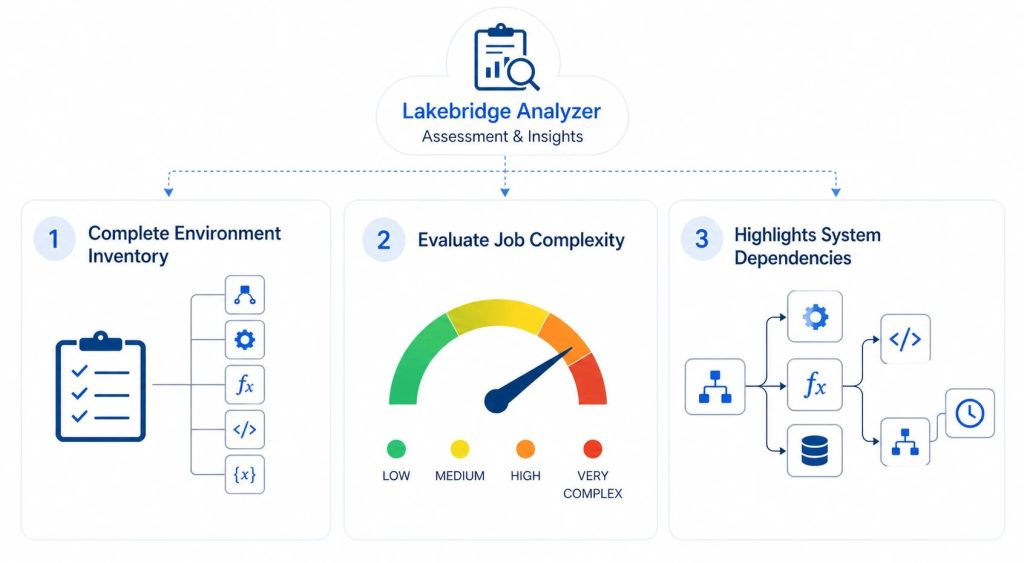
First, it provides a complete inventory of your environment. This includes everything from mappings and transformations to functions, programs, and dynamic variables. Instead of piecing things together manually, you get a structured overview of what actually exists in your legacy system. For example, in Informatica PowerCenter, this means a clear breakdown of all mappings and their underlying components.
Second, it evaluates job complexity. Each ETL or SQL job is analyzed and categorized (e.g., LOW to VERY COMPLEX) based on predefined rules and thresholds depending on each individual source system. This gives you a rough but practical estimate of how difficult each object will be to migrate. In our specific case for Informatica PowerCenter it provides a complexity score for each mapping and Mapplet based on:
- Total number of nodes
- Variety of transformation types (e.g., Source Qualifier, Joiner, Aggregator, Lookup)
- Presence of complex transformations
- Expression depth (e.g., Number of expressions with 5 or more function calls)
- Number of medium/high category breaks
Finally, it highlights dependencies across your system. The Analyzer maps how mappings, components, and workflows are connected, making it easier to understand execution order and upstream/downstream relationships. This is especially important when planning migration waves, since moving one piece in isolation can easily break something else if dependencies aren’t accounted for.
Taken together, this output turns a large and hard-to-interpret ETL metadata into a much more structured and understandable view, providing a solid starting point for planning what to migrate, in what order, and with what level of effort.
However, while these insights significantly accelerate technical discovery, they are limited to what can be derived from source metadata. They must be combined with business and architectural considerations to make the final migration decisions.
In our case, the output of the Analyzer helped us narrow down the technical scope and select a representative subset of mappings for deeper evaluation in the transpilation stage.
Our Approach
We began by extracting the Informatica workflow folder to a local workspace. Using the Lakebridge Analyzer, we then generated an Excel inventory document from the workflow folder metadata and reviewed the resulting report in detail. Based on that analysis, we selected 4 Informatica mappings spanning different complexity levels (LOW, MEDIUM, HIGH, and VERY COMPLEX) to thoroughly evaluate all different patterns and components with the Lakebridge Transpiler.
For more details on setting up and using the Lakebridge Analyzer follow this link.
Transpilation stage: Lakebridge Transpiler
Once the assessment is complete and we’ve decided which ETL workloads to migrate first, the next step is converting their logic into Databricks-compatible code.
For each mapping in Informatica PowerCenter, we would go through each component one by one, analyzing transformations, documenting logic, tracing inputs and outputs, and then reimplementing everything in Databricks-compatible code. As you may imagine this process is very time-consuming, and error-prone, it’s easy to overlook dependencies or subtle transformation logic along the way.
Within Databricks Lakebridge, The Lakebridge Transpiler simplifies this approach significantly with automating most of the manual work. Instead of manually reconstructing pipelines, it automates the conversion process by parsing the source artifacts and generating equivalent code for Databricks. What would typically take hours, or even days, can be reduced to minutes, while still preserving the structure and intent of the original mapping.
To understand how this works under the hood, it helps to look at how the Transpiler is designed. Lakebridge uses the Language Server Protocol (LSP) to dynamically discover and run different transpilers at runtime on the provided source code files. This modular approach allows it to support multiple conversion engines depending on the source system and workload type.
Currently, there are three transpilers available: Morpheus, BladeBridge, and Switch. Morpheus is a deterministic, SQL-focused tool that works well for straightforward SQL-only migrations, such as moving from Snowflake or Redshift. Switch is a more experimental, LLM-based option designed for cases where no deterministic transpiler exists.
BladeBridge, however, is the most relevant for our use case. It is a deterministic, configuration-driven transpiler that supports both SQL and ETL workloads. Most importantly for us, it’s the only transpiler that handles Informatica PowerCenter XML ETL workloads, directly converting mappings, sessions, and workflows into Databricks artifacts: PySpark or Spark SQL Python scripts. Because of this native support, BladeBridge was the clear choice for our migration scenario.
Our Approach
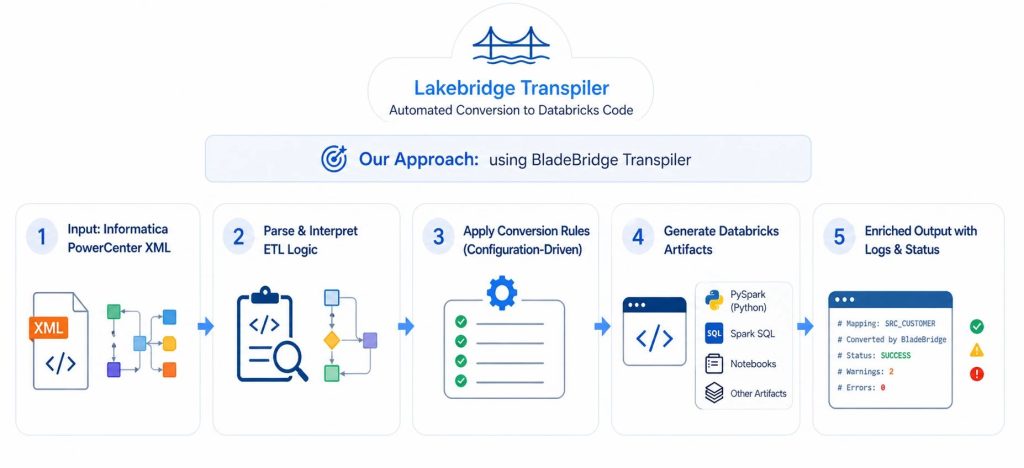
We ran each selected Informatica PowerCenter XML mapping through the Lakebridge BladeBridge Transpiler, generating Databricks-compatible outputs such as Spark SQL and PySpark scripts.
The BladeBridge Transpiler takes each exported XML mapping, parses and interprets the underlying ETL logic, then applying a set of configuration-driven conversion rules it generates equivalent outputs in the target format, which can include notebooks, Spark SQL, PySpark scripts, and other Databricks artifacts.
The generated output follows the structure of the input as closely as possible, making it easier to trace how source components map to the converted code. In addition, the Transpiler enriches the output with header comments and logs that capture conversion status, including successes, warnings, and errors. helping identify areas that may require manual adjustment.
For more details on setting up and using the Lakebridge Transpiler follow this link.
Lakebridge Transpiler Evaluation
With the representative set of XML mappings successfully transpiled, the next step is to evaluate the produced logic of the transpiled scripts. We want to answer questions like:
- Does the generated logic actually work?
- How closely does it match the original ETL behavior?
- Where are the gaps or limitations?
This chapter provides a comprehensive analysis of the BladeBridge transpilation results, highlighting where it delivers strong results, where it struggles, and what you need to know before relying on it for your Informatica to Databricks migration.
Capabilities: Areas of Strong Performance
Rapid Initial Conversion
One of the most significant advantages of using BladeBridge transpile is the speed at which you get an initial working version of your migration. What would typically take days of manual conversion can be accomplished in few minutes (1-5 minutes). The transpiler processes your entire mapping and produces PySpark or Spark SQL variant, giving you a solid foundation to work from.
Component-by-Component Separation
First thing you’ll notice with transpiled scripts is that all Informatica component elements are mapped out in order with clear comments on original Informatica type, node name, additonal description and optional failure statuses. This greatly simplifies comparison of what Spark logic was used for what Informatica component, making it easy to trace through the logic and identify areas needing attention.
...
# COMMAND ----------
# Processing node DIM_METRICS, type SOURCE
# COLUMN COUNT: 8
...
# COMMAND ----------
# Processing node fil_dim_metrics_data, type FILTER
# COLUMN COUNT: 8
...
# COMMAND ----------
# Processing node metrics_IN, type ROUTER . Note: using additional SELECT to rename incoming columns
# COLUMN COUNT: 35
...
Robust Support for Common Transformations
Most standard Informatica transformations transpile correctly with minimal or no manual intervention needed. Mostly issues in syntax arrise ony with custom SQL expressions logic and complex expression logic. A more detailed list of issues will be listed in later section.
This is a list of components used in our transpiled Python scripts and a short overview of the quality of their transpiled code:
| Component | Transpilation Quality | Short Overview |
|---|---|---|
| Source Qualifier | High | Copies SQL as-is (sometimes needs manual refactoring), adds sys_row_id/source_record_id column. |
| Target | Moderate | Straightforward append/overwrite. Needs additional refactoring for upsert/merge statements. |
| Aggregator | Very High | Handles GROUP BY and aggregates well. |
| Expression | Moderate | Converts most SQL expressions correctly, for more complex logic Databricks specific optimization is required. |
| Filter | Very High | Straightforward WHERE clause translation. |
| Joiner | Very High | Straightforward JOIN translation. |
| Router | Moderate | Filter-based routing works well. Creates multiple large routing logic sections that can sometimes be difficult to navigate and understand. |
| Sorter | Very High | Straightforward ORDER BY translation. |
| Union | High | Straighforward UNION operation translation. Need to manually differentiate UNION ALL and UNION operation. |
| Mapplet | Moderate | Converted into reusable functions, should be tested independently. |
| Input (Mapplet), Output (Mapplet) | High | Correctly handled with proper column mapping, expected input and output structure. |
| Lookup | Moderate | Partially supported. PySpark works well, Spark SQL requires manual fixes. |
| Custom Transformation | Not Supported | Not reliably supported. Requires manual validation. |
| Sequence (Generator), Transaction Control, SQL Transformation, Stored Procedure, Java Transformation | Not Supported | Not supported. Requires redesign using Databricks native features. |
Example – Filter Transformation:
# PySpark
filter(expr(f"""IF (CURRENT_FLAG = '{'{p_flag_yes}'}' AND LOCATION_ID != - 1, true, false)"""))
# Spark_SQL
WHERE IF(exp_setinput_dim.CURRENT_FLAG = {'{p_flag_yes}'} AND exp_setinput_dim.LOCATION <> - 1, TRUE, FALSE)
Intelligent Mapplet Handling
When using Mapplets in Informatica, the BladeBridge transpiler converts Mapplet logic into Python functions that are callable with provided dataframe and metadata. This means validating the Mapplet function will automatically make it valid for all other mappings that use the same Mapplet, preserving and leveraging existing Informatica logic.
Example:
mplt_UserPassword_Masking = mplt_UserPassword_Masking(mplt_UserPassword_Masking_INPUT)
def mplt_UserPassword_Masking(INPUT):
    # Mapplet logic becomes a reusable function
    # Expression, Joiner, Filter components inside
    return output
Smart Hash-Based Row Identification
For Source and Lookup and sometimes other components, BladeBridge adds an xxhash64 column that uniquely identifies each row based on all column values. This is particularly helpful when transpiling Lookup components into two join dataframes in PySpark, enabling faster joins using the hash column.
Limitations: Where Manual Intervention is Required
While most transpiled scripts components work, certain components and patterns require manual remediation. The most common areas to pay attention to include:
Lookup Components in Spark SQL
While lookup transformations transpile correctly in PySpark, the Spark SQL output is often incorrect and requires significant refactoring.
The main issue lies in the overuse of xxhash64 function to generate unique source_record_id column for each source, lookup and even intermmediate tables. Then trying to JOIN unique hashes of different tables that have different overall columns.
To resolve this, The same source_record_id hashing approach used in PySpark should be followed. By using xxhash64 generation of source_record_id columns only on the source tables, and then when joining Lookup tables with source tables leaving the same source_record_id column to later match on further joins with other Lookup tables, this enables more optimized lookup joins and remediates previous incorrect logic.
Informatica specific components
Several Informatica-specific transformations do not translate cleanly and require manual intervention after transpilation.
- Sequence Generator is not properly implemented – BladeBridge typically inserts
seq_primary_key.NEXTVAL, which has no direct equivalent in Spark. In Databricks, this should be replaced with aGENERATE ALWAYS AS IDENTITYcolumn set in the target table CREATE statement. For MERGE-based pipelines, additional custom logic is required. - Java transformations are not converted at all. The transpiler either leaves them commented out or simply flags their presence without generating executable code. These must be fully reimplemented manually, on a case-by-case basis.
- Update Strategy, being specific to Informatica, does not apply in Databricks. BladeBridge often introduces unnecessary columns such as
UPDATE_STRATEGY_ACTIONorpyspark_data_action, which should be removed as they serve no functional purpose.
Oracle/Informatica-Specific Syntax
For custom SQL statements containing Oracle or Informatica-specific syntax (variables, storage specifications like partitioning/caching), the transpiler leaves the SQL as-is. The developer must manually adapt these for Databricks.
Examples:
- Sequence references (
seq_name.NEXTVAL) - Oracle-specific functions
- Partition/cluster specifications
...
SELECT ... FROM
 D_LOCATIONS partition ('{partition_id}')
 WHERE
 ...
- Cache directives
Hardcoded Path Locations
Hardcoded path locations that worked on the source Informatica system will be directly copied to PySpark structure with leaving the same path as-is. For this logic to function correctly, the same file must be created in a Databricks-supported storage location (such as object storage or a volume), and the referenced path updated accordingly:
# Before (wrong)
dt = spark.read.format("csv").load('/root/local/workflow/path/file.csv')
# After (correct)
dt = spark.read.format("csv").load('Volume/workflow/path/file.csv')
Parameter Syntax Issues
The transpiler sometimes keeps incorrect parameter references that don’t match Databricks expected format. This invalid format is easily fixed with Global replace of malformed variable substitutions with correct formatting syntax.
Example:
Replace {{('param_name')}} with '{param_name}'
Expression syntax mistakes
In rare cases, Lakebridge may introduce errors when transpiling expression logic, resulting in incorrect syntax, inconsistent formatting, or improperly handled escape characters:
Example mistakes and appropriate fixes:
- Change
TO_DATE('2.1.2023','dd.MM.y')toTO_DATE('02.01.2023','dd.MM.y') - Change
DECODE ( EXP_ID IS NULL = false)toDECODE ( EXP_ID IS NOT NULL) - Empty
INclause :lkp_locations.LOCATION_NAME IN ( )- compare to original XML and apply the necessary corrections
- Incorrect datetime formatting based on column: Replace
mm/dd/yyyy hh24:mi:sswithMM/dd/y HH:mm:ssfor columUPDATE_TIMESTAMP - …
Conclusion
The migration of ETL logic from a legacy data warehouse to a Lakehouse is one of the most complex, if not the most complex, phase of the entire migration. ETL pipelines are often large and complex, with extensive transformation logic, interdependent workflows, and platform-specific customizations. As a result, manual migration is slow and error-prone, requiring careful tracing of data flows, untangling dependencies, and rewriting logic, often leading to inconsistencies and overlooked edge cases.
This is exactly where tools like Databricks Lakebridge become essential, helping turn what would otherwise be a full manual rewrite into a more structured and largely automated ETL modernization process. Based on our evaluation, Lakebridge significantly reduces the initial effort by analyzing complexity and generating structured PySpark or Spark SQL code that closely aligns with the original logic. While a portion of the work still requires manual refinement due to real-world complexity, the overall approach allows teams to focus more on optimization and production readiness.
In the third blog of the series, we further improved and automated the ETL migration process, complementing Lakebridge with Jarvis, our CROZ internal LLM tool. Jarvis assisted us in refining the transpiled code, resolving remaining gaps, and bringing the pipelines closer to production readiness.