

A practical guide to assessing your VMware environment and designing a migration roadmap to OpenShift Virtualization
This is the third blog in our series on VMware to OpenShift Virtualization migration. Read Blog #1: Why are we moving away from VMware? and Blog #2: Introduction OpenShift Virtualization first.
In our previous blogs, we explored the business drivers pushing organizations away from VMware and examined the technical architecture of OpenShift Virtualization. Both discussions led to a consistent conclusion: this migration is fundamentally about people and process, not just technology.
Now comes the hard part: actually planning the move. Here’s a question that catches many teams off guard: do you really know what you have?
We’ve worked with multiple organizations on this kind of migration, and we’ve seen a consistent pattern. Teams spend weeks evaluating OpenShift Virtualization’s capabilities like validating live migration, testing VM operating system support, benchmarking performance. These are worthwhile exercises, but they miss the real challenge.
The migrations that struggle aren’t the ones where OpenShift Virtualization doesn’t work. They’re the ones where the storage array’s CSI driver falls short, where the backup solution can’t protect the new environment, or where disaster recovery procedures simply don’t translate.
The assessment phase is where VMware-to-OpenShift migrations succeed or fail. Not because OpenShift Virtualization is difficult to deploy as the platform is mature and well-documented. The challenge lies elsewhere. In the third-party integrations you’ve built over years of VMware operations. Your storage array, your backup solution, your disaster recovery procedures, your monitoring stack, all these components worked seamlessly with VMware/vSphere. Making them work with OpenShift Virtualization requires careful planning, sometimes vendor engagement, and occasionally creative problem-solving.
This blog walks through our approach to VMware takeout planning. We’ll cover how to assess your existing landscape, why third-party integrations deserve more attention than the virtualization platform itself, how to design migration roadmaps, and which personas you need on your team. The goal is a pragmatic framework you can adapt to your organization’s specific circumstances.
Getting a Clinical Picture of Your Environment
Data Collection with RVTools
Before you can plan a migration, you need complete picture about what you’re migrating. The challenge isn’t gathering data, as VMware environments generate vast amounts of telemetry, but gathering the right data and interpreting it correctly.
RVTools remains one of the most valuable tools for VMware inventory assessment. This free utility exports detailed information about your vSphere environment, including VMs, hosts, datastores, networks, and resource pools. The exported data in Excel format provides a starting point for analysis that you can filter, sort, and aggregate to understand your environment’s characteristics.
When reviewing RVTools data, we focus on several key dimensions:
- VM Density – How many VMs exist relative to your hosts? This helps us determin sizing for OpenShift worker nodes
- Datastore Distribution – How is storage provisioned? Do you have consistent performance characteristics across your environment?
- Snapshot Age and Size – Old snapshots indicate either forgotten checkpoints or workflows that depend on snapshot functionality your new platform must replicate.
- Resource Utilization – Identify VMs with consistent high resource utilization that might need special consideration during migration.
- Guest OS Info – Identify which Operating Systems you are working with (including appliances)
Beyond RVTools, collect additional data about performance characteristics, network topology, and application dependencies. Performance data from vCenter or your monitoring tools helps identify VMs with consistent high resource utilization.
Network topology documentation reveals complex configurations that may require reimplementation. Application dependency mapping helps us understanding which VMs communicate with which and why that prevents surprises when you start moving workloads between platforms.
T-Shirt Sizing Your Migration Units
After data collection, organize VMs into migration units that can move together. We use a T-shirt sizing approach: small, medium, and large. This isn’t about precise capacity planning, but rather it’s about creating work packages that teams can execute systematically. However, T-shirt sizing is not the only parameter used for defining migration packages. Dependencies between systems and VM ownership play a significant role in how units are formed. Packaging should account for application relationships, shared services, and operational ownership to minimize disruption. Whenever possible, migrations should be organized team-by-team to simplify coordination and reduce cross-team impact during cutovers.
Small migrations involve a handful of VMs with simple dependencies, typically completing within a single migration window. These are ideal for initial validation, team training, and proving out migration procedures before scaling to larger efforts.
Medium migrations include one to two group of related VMs that can be moved during off-hours maintenance windows. These require more coordination and typically include dependencies like databases, application servers, and frontend components. Planning for these migrations involves detailed sequencing, ownership alignment, and verification steps.
Large migrations are multi-day or multi-week efforts involving entire clusters or application suites. These require project-level management, staged cutovers, clear ownership accountability, and rollback planning. Most organizations should plan for a phased approach rather than attempting to migrate everything at once, ideally sequencing migrations along application and team boundaries to maintain operational stability.
Third-Party Integration Challenges
Storage Integration Realities
Storage integration is where we see the most predictable, and most often overlooked, challenges in VMware to OpenShift Virtualization migrations. Your existing storage infrastructure worked with vSphere through a well-understood integration layer. OpenShift Virtualization requires CSI drivers, and the maturity of these drivers varies significantly across vendors.
The critical questions center on functionality parity. Does your storage array’s CSI driver support the same snapshot capabilities your backup solution depends on? Can it handle the clone operations you use for test environment provisioning? Does it provide the performance characteristics your latency-sensitive applications require?
We’ve encountered situations where storage arrays with excellent vSphere integration offered CSI drivers with limited functionality. In one case, the driver snapshot support required storage array configuration that wasn’t documented, requiring vendor engagement to resolve. In another case, the driver supported snapshots but not the incremental snapshot workflow the backup software expected, necessitating a backup solution change.
Performance testing is equally important. Storage performance in OpenShift Virtualization differs from vSphere in subtle ways. IO patterns from containerized workloads can differ from traditional VM patterns, and the CSI driver’s efficiency varies. We recommend deploying proof-of-concept VMs on your storage array and running representative workloads before committing to migration.
Backup and Recovery Integration
Your backup solution’s OpenShift Virtualization support deserves careful investigation. VMware environments typically integrate with backup tools through APIs that understand vSphere constructs like resource pools, datastores, and VM snapshots. OpenShift Virtualization exposes different APIs, and backup vendors have varying levels of support.
For organizations using Veritas Enterprise Vault, Veritas Backup Exec, or similar Veritas solutions, the integration story varies by product version and OpenShift configuration. Veritas has been expanding their Kubernetes-native backup capabilities, but the specific capabilities for OpenShift Virtualization VMs depend on your deployment model. Investigate whether your current license includes the required features, whether you need upgrades, and whether the backup solution can meet your recovery time and point objectives for the workloads you’re migrating.
Alternative solutions like Kasten by Veeam and Velero offer Kubernetes-native approaches to VM backup within OpenShift. These tools integrate directly with KubeVirt APIs and can provide consistent protection for VMs running on OpenShift Virtualization. However, they represent a shift from your existing backup tooling, which may require additional training and operational changes.
The backup integration question isn’t just about whether your existing solution works, it’s about whether it provides the same level of assurance you’re accustomed to. Test restores before migration. Validate that your backup workflows can complete within acceptable windows. Document recovery procedures for each workload class you’re migrating.
Disaster Recovery Considerations
Disaster recovery procedures built for VMware environments often depend on vSphere-specific features like Site Recovery Manager (SRM) or array-based replication. These don’t directly translate to OpenShift Virtualization environments, requiring either new DR solutions or creative adaptation of existing ones.
If you’re using array-based replication for DR, your storage array’s CSI driver may or may not expose the same replication capabilities. Some vendors have developed operators that extend Kubernetes with replication features, but these require separate installation and configuration.
For SRM users, the path forward is less clear. SRM has no direct OpenShift Virtualization equivalent. Organizations in this situation typically evaluate either third-party DR solutions designed for Kubernetes environments or build new DR procedures using native OpenShift and Kubernetes capabilities.
The DR assessment should identify your current recovery capabilities, map them to OpenShift Virtualization alternatives, and establish a timeline for implementing new DR procedures before migrating production workloads.
Building Your Migration Roadmap
High-Level Planning Principles
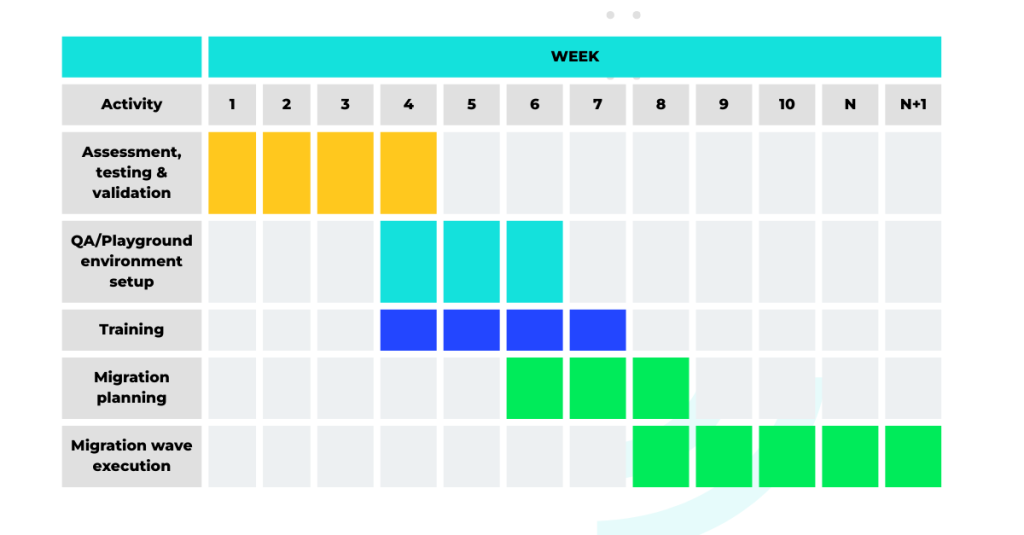
With assessment complete and integration challenges identified, you can build your migration roadmap. This roadmap should be realistic about timelines, mindful of risks, and structured to deliver value incrementally rather than attempting a big-bang cutover.
We recommend planning in phases that build organizational capability. Early phases migrate less critical workloads where the team can learn and refine processes. Later phases tackle production workloads once the team has gained confidence and resolved integration issues encountered during initial migrations.
Including Training in Your Roadmap
Training is often the afterthought in migration projects, squeezed in between technical tasks or assumed to happen organically. We strongly recommend building explicit training activities into your migration roadmap at multiple levels.
VMware administrators need hands-on experience with OpenShift concepts before migration begins. This includes understanding Kubernetes fundamentals, working with YAML manifests, and developing comfort with the OpenShift web console, CLI and concepts like GitOps. Without this foundation, administrators will struggle during migration and resist adopting new practices.
Application owners need understanding of how their workloads will operate in the new environment. This includes changes to deployment practices, monitoring approaches, and operational workflows. Application teams should participate in migrations of their workloads rather than having infrastructure teams handle everything in isolation.
Operations teams need training on backup procedures, recovery processes, and monitoring for OpenShift Virtualization environments. The operational surface area differs from VMware, and existing runbooks will need updates or complete rewrites.
Schedule training early enough that it’s completed before teams need to apply it. We typically recommend beginning administrator training during the assessment phase, with application-specific training occurring alongside pilot migrations.
Finally, organizations should allocate dedicated time and provide a structured environment for customers or internal platform users to adapt their existing automations to the new platform. Many teams rely on scripts, pipelines, API integrations, or infrastructure-as-code built around the current environment. These automations will not automatically translate to the new platform and may require refactoring or redesign. Providing a clear transition window, documentation, and technical support will significantly reduce friction and accelerate adoption of the new environment.
Persona Mapping
Who You Need on Your Migration Team
Successful VMware to OpenShift Virtualization migrations require diverse expertise that no single person typically possesses. Understanding which personas contribute to the effort helps with resource planning and identifying gaps in your current team.
| Role | Responsibility |
|---|---|
| Infrastructure Architect | Target architecture, cluster sizing, network and storage design |
| Storage Specialist | Backend storage configuration, CSI driver configuration, storage class setup, performance validation, SAN zoning |
| Backup Specialist | Backup solution integration, RPO/RTO validation, recovery testing |
| Network Engineer | Network topology, VLANs, firewall configuration, routing, load balancers |
| VMware Administrator | Current environment knowledge, VMware-to-Kubernetes concept translation |
| Application Owner | Workload-specific requirements, migration participation |
| Project Manager | Cross-team coordination, timeline management, stakeholder communication |
These personas rarely exist in a single team in typical VMware environments. The migration requires building cross-functional collaboration between storage, network, backup, and virtualization teams that may have operated independently. Organizational change management is as important as technical planning.
Conclusion
The path from VMware to OpenShift Virtualization begins with honest assessment of what you have and realistic planning for what needs to change. OpenShift Virtualization itself is a capable, mature platform. The integration challenges around storage, backup, and disaster recovery deserve more attention than the virtualization layer.
Before scheduling any VM migrations, invest time in understanding your current environment’s characteristics, validating third-party integration compatibility, and building teams with the required expertise.
Plan migration roadmaps that deliver incremental value, build organizational capability progressively, and include training as a first-class activity rather than an afterthought.
In our next blog, we’ll move from planning to execution. “Migrations in the Wild: Lessons from the Field” examines real-world migration experiences, the challenges our teams encounter during execution, and practical approaches to common problems. These are the insights that only come from doing migrations repeatedly across different environments.