

Picture this: it’s 2 AM, you’re knee-deep in a COBOL incident. The payroll batch just dumped core because a copybook changed, and now you’ve got the classic combo: broken run, angry stakeholders, and a release train that suddenly feels like a handcar.
I’ve lived that night. The good news: you don’t fix this by “working harder” or by stapling a few scripts onto the side of the mainframe. You fix it by making changes traceable, builds repeatable, tests automatic, and deployments boring.
This is a familiar story for teams trying to adopt DevOps for mainframe environments, where COBOL systems, batch processing, and release pressure collide without modern delivery practices in place.
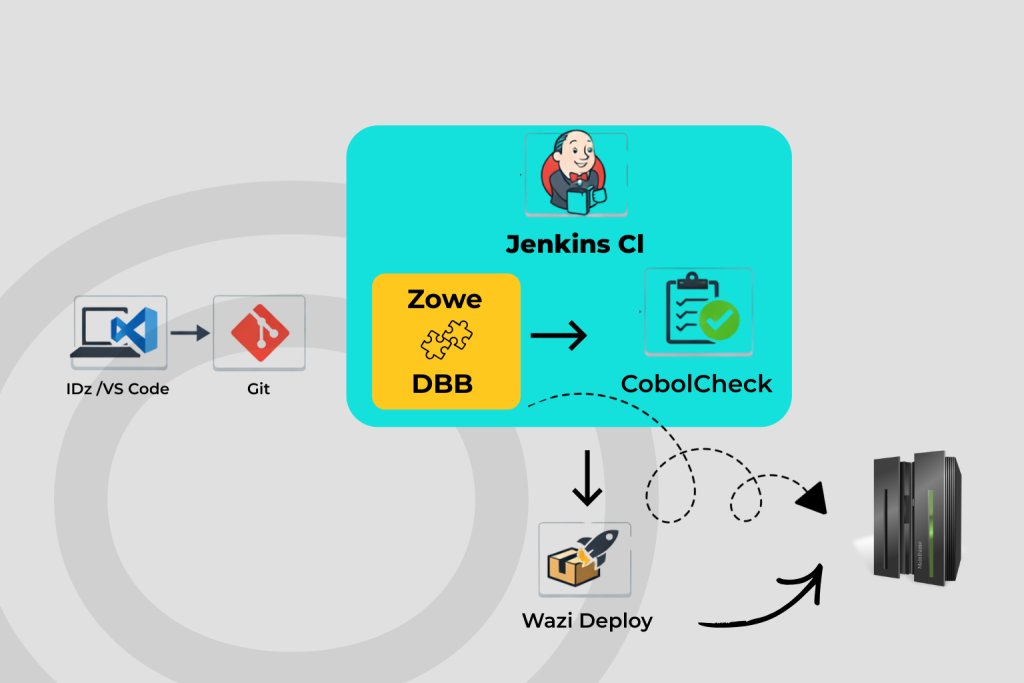
Below is one project day, step by step, showing how we moved from chaos to a smooth pipeline using a practical IBM Z DevOps toolchain (IDz + VS Code, Git, DBB, Zowe, Jenkins, CobolCheck, and Wazi Deploy).
Spoiler: No heroics required.
Step 1: Spot the Bug – IDz to the Rescue
The day starts with a failing batch run and a clue: “something changed” (the most expensive sentence in IT).
I open IBM Developer for z/OS for Eclipse (IDz) and jump into the COBOL module that’s implicated. Between syntax highlighting, content assist, copybook awareness, and being able to debug against z/OS without living in a terminal, I can actually see what the program is doing instead of guessing. I find the issue: the program is calling the wrong CICS transaction after a recent change, and the control flow takes a path nobody tested last release.
Yes, Eclipse can feel heavy, like it’s carrying the history of the platform on its back, but this is exactly where a heavyweight IDE earns its keep: you catch production-killers fast and you catch them in context.
Fix drafted. Next step: make the smallest safe change, fast.
Step 2: Make the Patch – VS Code Quick-Draw
But there is also another alternative for all edits (JCL, PROCs, quick COBOL adjustments and so on): flip to VS Code with mainframe extensions. This is where the experience becomes modern for the whole team, especially people who do want a light weighted IDE for every touch.
With the Zowe Explorer Extension I can work with z/OS assets (datasets, PDS members, USS files) in a way that feels like normal development instead of “mainframe ceremony.” It’s fast, familiar, and it removes the “3270 shock” for newer engineers.
Is it a full refactoring powerhouse? Not really. But for quick, controlled edits, especially around JCL and config, it’s perfect.
Change made. Now we put it under control.
Step 3: Branch and Build – Git + DBB Team-Up
Now comes the point: we stop treating the mainframe like a special snowflake and start treating it like any other software platform.
I create a Git branch for the fix and open a pull request. That means:
- The change is visible.
- The review is explicit.
- The “who changed what and why” is recorded without relying on tribal memory.
Then the real hero steps in: IBM Dependency Based Build (DBB).
Here’s the key: on mainframe, “a small change” is often a lie. Touch one copybook and suddenly you have dozens of compile targets that might be impacted. DBB helps by building based on dependencies, so the pipeline can recompile what changed and what is affected, without rebuilding the entire application every time.
The first time you establish a baseline, it can take a bit (that’s the price of learning the dependency graph). After that, incremental builds are where the payoff shows up: shorter cycle time, cleaner audit trail, and fewer “why did this unrelated module change?” surprises.
Branch ready. PR open. Time for automation.
Step 4: Pipeline Time – Jenkins Orchestrates, Zowe Connects
After merging the pull request, a pipeline is triggered in Jenkins. This is where the story stops being “one developer fixing a problem” and becomes “a system that prevents the same pain next month.”
The pipeline runs repeatable steps:
- Compile/build
- Static checks and basic quality gates
- Execute controlled test jobs on the target system
- Package the application
Zowe is the glue between Jenkins and the Mainframe that makes this feel modern. Instead of custom one-off scripts and fragile remote command chains, you can submit jobs, monitor execution, and retrieve job output in a structured way – exactly what you want when working in a CI/CD way.
The important part isn’t “magic,” it’s reliability: the pipeline can do the same thing every time and leave evidence behind. un fact: With other orchestrators (TeamCity, GitLab CI) you won’t even need Zowe to handle a modern CI/CD pipeline.
One caveat: Groovy pipelines can get messy if you treat them like a dumping ground. Keep them modular. Make stages readable. Your future self will thank you.
Pipeline runs. Now we test like professionals.
Step 5: Test Like a Boss – CobolCheck Makes Regression Real
Mainframe teams often say, “We can’t unit test COBOL like modern stacks.”
You can, if you make it part of the pipeline and keep it pragmatic.
CobolCheck gives you a COBOL-native unit testing approach. That matters because it reduces friction: you don’t have to introduce an entirely new language or runtime just to test. You write tests that validate the business logic (payroll totals, edge cases, rounding rules, boundary conditions) and you run them automatically.
For anything that’s tricky to isolate (like external calls), you use isolation patterns that keep tests deterministic. The goal isn’t to perfectly simulate the universe, it’s to stop shipping the same bug twice.
This is where we catch the things, manual tests miss: an off-by-one that only shows up when the input record count hits a specific boundary. It would have been a weekend incident. Instead, it’s a failed test and a quick fix.
Tests pass. PR goes green. Now we deploy – without drama.
Step 6: Deploy and Chill – Wazi Deploy Makes Promotions Boring
Deployment is where mainframe teams traditionally pay for complexity: manual steps, environment drift, and the dreaded “it was fine in test.”
Wazi Deploy helps by automating deployments as a controlled process that the pipeline can drive. In practice, that means:
- Your CI produces build outputs (artifacts).
- Those artifacts are promoted through environments using a consistent deployment mechanism.
- Configuration overlays and environment-specific rules are applied in a repeatable way.
- Promotions become a deliberate step, not a late-night ritual.
Important clarification: Wazi Deploy is not “a big red button UI.” It’s automation you plug into your delivery process, often pipeline-driven, so deployment becomes consistent, auditable, and predictable.
Weekly releases stop being scary. Hotfixes stop being chaotic. And “the mainframe is the blocker” stops being an excuse people can hide behind.
The Happy Ending: DevOps for Mainframe with a Modern Rhythm
This is DevOps for mainframe working as intended: the system carries the load, not the people. By lunch, payroll is stable and released without a fire drill. The bigger win isn’t the one fix, it’s the delivery system:
- Engineers work in tools they can actually enjoy (IDz, VS Code ).
- Git makes changes visible, reviewable, and traceable.
- DBB keeps builds smart instead of brute force.
- Jenkins automates the process.
- Zowe makes automation practical against z/OS.
- CobolCheck gives you regression safety.
- Wazi Deploy makes promotion repeatable and boring (the highest compliment in operations).
This is what DevOps for mainframe looks like and that’s how you get fewer all-nighters: not by “being careful,” but by building a path where careful is the default.